
A cross-platform screen capture tool featuring offline OCR, image search, and integrated translation capabilities.
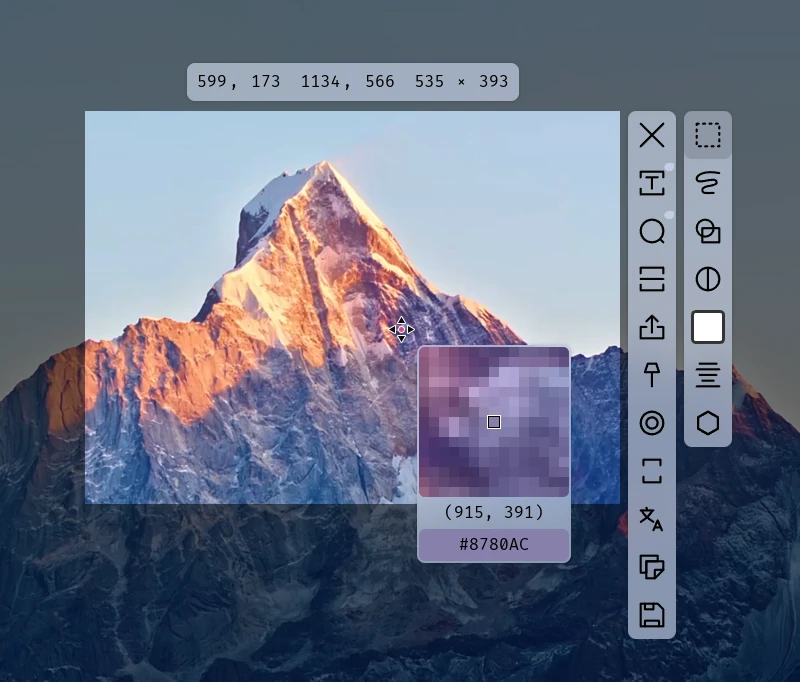
eSearch is an open-source desktop app that combines screen capture with information retrieval tools. It provides a unified interface for taking screenshots, performing optical character recognition, and searching for content across the web. The application is available for Windows, macOS, and Linux, filling a gap for users who want mobile-style screen search functionality on a desktop environment.
Users typically launch the application from their system tray and trigger captures via a keyboard shortcut, such as Alt + C. Beyond basic image capture, the software allows users to pin images to the screen as floating windows and integrate various translation or search engines to process the captured data. It is designed to handle the entire workflow from capturing a visual element to translating or searching for its meaning in a single process.
Key features
- Offline OCR based on PaddleOCR with support for multiple languages and vertical text.
- Screen pinning that allows images to float with adjustable transparency and mouse penetration.
- Scrolling screenshots that support horizontal, vertical, and omnidirectional stitching.
- Integrated search and translation using engines like Google, DeepL, and various AI APIs.
- Screen recording with cursor highlighting, keyboard stroke visualization, and virtual backgrounds.
- Image beautification tools including custom backgrounds, rounded corners, and object removal.
- Reverse image search integration with Google, Baidu, and Yandex.
- Color picker and drawing tools for annotating screenshots.
Built with Electron, eSearch is designed for users who need a comprehensive productivity hub rather than a simple capture tool. It integrates the ONNX runtime for local AI models and FFmpeg for video processing, enabling features like offline text recognition and advanced screen recording without relying entirely on cloud services. The architecture supports a wide array of languages, including Chinese, English, Arabic, and Russian, making it suitable for international workflows. It also allows for the customization of AI interfaces to interact with images using multimodal large models.
It is a cross-platform information portal that bridges the gap between screen capture and active data search.
Similar Open Source Software

ShareX
Captures screen regions, records video and GIFs, and uploads files to various cloud destinations via keyboard shortcuts.

PicGo
An image upload utility that automates hosting and link generation for markdown editors and developer documentation.

Join our newsletter to get shiny new open source software delivered to your inbox. Unsubscribe anytime.