
Identifies the capabilities and performance bottlenecks of USB-C and Thunderbolt cables connected to Apple Silicon Macs.
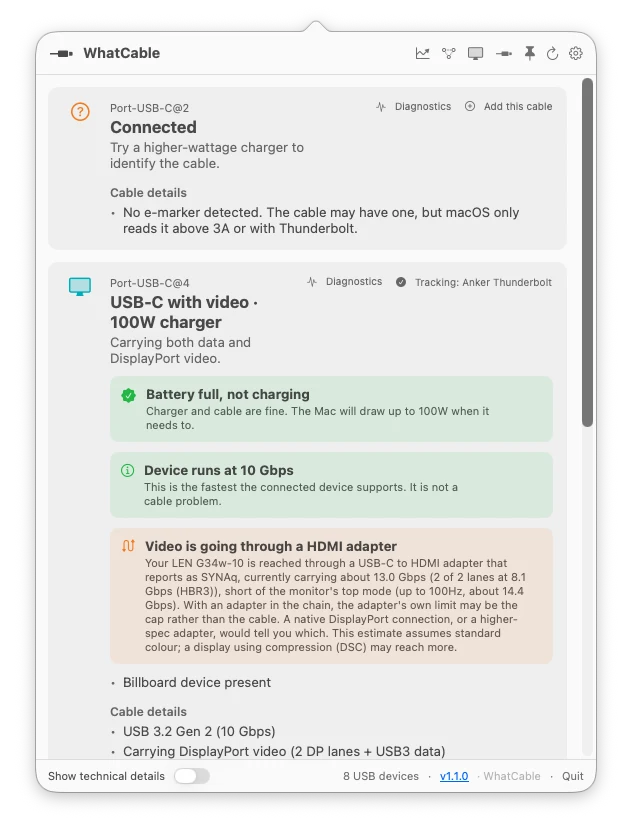
WhatCable is an open-source utility for macOS that identifies the capabilities of connected USB-C and Thunderbolt cables. It serves as a diagnostic tool to determine why a device may be charging slowly or transferring data at reduced speeds by surfacing technical data from IOKit into a readable menu bar interface. This tool helps users distinguish between high-bandwidth Thunderbolt 4 cables and basic USB 2.0 charge-only cables that often look identical physically.
The application is designed specifically for Apple Silicon Macs running macOS 14 or later. It can be installed as a standard desktop application by dragging it to the Applications folder or via Homebrew, which also provides a command-line interface for users who prefer terminal-based diagnostics over the graphical menu bar popover. Because it requires low-level IOKit reads, the software is distributed outside the Mac App Store to avoid App Sandbox restrictions.
Key features
- Charging diagnostics that identify if a cable is limiting the charging speed
- Data-speed verdicts explaining whether the Mac port, cable, or device is the bottleneck
- E-marker information including cable speed, current rating, and chip vendor
- Trust signals that flag unusual e-marker values that deviate from USB-PD specifications
- Charger PDO lists showing all advertised voltage profiles and the currently negotiated one
- Thunderbolt fabric visualization showing per-lane speed and switch topology for docks
- Identification of known cable brands and models via a bundled database
- Desktop widgets for live cable status monitoring via WidgetKit
- Access to raw IOKit properties for engineering and debugging purposes
Built with Swift and SwiftUI, the tool is intended for hardware enthusiasts, IT professionals, and engineers who need to verify the specifications of their hardware chain. It monitors active transports including USB 2, USB 3, Thunderbolt, and DisplayPort. The software also includes a system for reporting anonymized port and power diagnostics to improve hardware coverage for the community. For those who prefer a terminal environment, the bundled CLI allows for scripting and remote monitoring via SSH.
WhatCable positions itself as a specialized hardware diagnostic tool for the macOS ecosystem.
Similar Open Source Software

Glance
A self-hosted dashboard that aggregates RSS feeds, social media posts, and system monitoring into one interface.

Mealie
A self hosted recipe manager and meal planner with automated import capabilities and shopping list integration.
Join our newsletter to get shiny new open source software delivered to your inbox. Unsubscribe anytime.